
Scheduling for personal trainers
Personal trainer scheduling and calendar, with automatic reminders
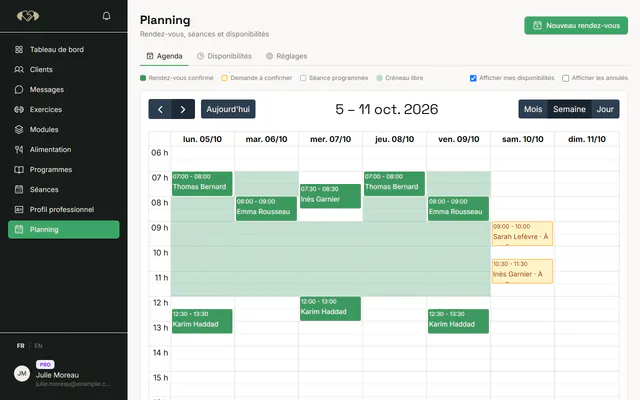
I Train With You's calendar brings your appointments and your clients' training sessions into one schedule. You set your availability, your clients book a free slot if you allow it, and everyone gets a reminder before the session. It is included in every plan, the free plan too.
- Availability, bookings and recurring sessions
- Automatic reminders by notification and email
- Sync with the calendar app you already use
Free for 1 client · no credit card · no commitment
What the calendar does
A trainer's calendar is not an office calendar: it has to handle changing locations, clients who cancel and sessions that repeat every week. Here is what is available today.
Availability and exceptions
You set your usual working hours, then your exceptions: holidays, a bank holiday, an extra one-off slot. Free slots are calculated automatically from these rules and your appointments.
Appointments with a location
Each appointment has a client, a duration and a location: the client's home, outdoors, a gym or remote. You see at a glance where you need to be and how much time you need between two sessions.
Client booking
If you turn it on, your clients see your free slots in their app and book themselves. You choose automatic confirmation or manual approval, the minimum notice before a booking and how far ahead people can book.
Recurring sessions
A client comes every Tuesday at 6 pm? Create a series once: appointments are generated for the following weeks. You can move a single session, or change and stop the rest of the series.
No double booking
Two appointments can never take the same slot: the check is enforced by the database itself, even if two clients book in the same second.
Automatic reminders
Your clients get a reminder 24 hours and then 1 hour before a confirmed appointment, and 1 hour before a planned training session, by notification and email depending on their preferences.
How a client books a session
Online booking is optional. When you offer it, the flow takes four steps.
You publish your availability
Once your hours and rules are set, there is nothing else to do: free slots update with every new appointment.
The client picks a slot
In their app, they only see slots that are really free, taking into account the minimum notice you set.
You confirm, or it is automatic
With manual confirmation, you accept or decline the request. With automatic confirmation, the appointment is confirmed straight away.
Invitation and reminders go out on their own
The client receives an email invitation to add to their own calendar, then reminders before the session. After the appointment, I Train With You asks you to record whether it took place.
The settings that prevent misunderstandings
The rules are the same for all your clients. Here are the available settings and the values used until you change them.
| Setting | Default value | What it is for |
|---|---|---|
| Cancellation notice | 24 hours | Below it, a cancellation is late, whether you or the client cancels |
| Minimum booking notice | 12 hours | Prevents last-minute bookings |
| Booking horizon | 60 days | How far ahead a client can book |
| Client booking | Off | You decide whether clients book themselves |
| Automatic confirmation | Off | Confirms bookings without your approval |
| Inactivity alert | 7 days | Warns you when a client stops training |
The late-cancellation rule is symmetric: it applies the same way to the trainer and the client, which makes it easier to accept.
Appointments and training sessions: one schedule
A trainer handles two kinds of events. Appointments are the times you are with the client, in person or remotely. Training sessions are the work the client does, with or without you, from their program. In I Train With You, both appear in the same calendar.
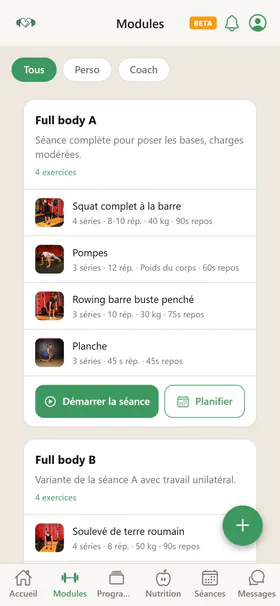
When you apply a program's typical week over several weeks, sessions are scheduled automatically with load progression. Your client finds them in their app, and your calendar shows what they should do each day, what they did and what they skipped. To build those programs, read our guide to training periodisation.
Sync with the calendar you already use
Already keep a personal calendar on your phone? Every user has a private subscription link (ICS format) to add to Google Calendar, Apple Calendar or Outlook. Your appointments and sessions appear there and update automatically. Sync runs from I Train With You to your calendar: appointments are changed in I Train With You, which keeps free slots accurate.
The link is personal. If you think it was shared by mistake, you revoke it and create a new one in one click.
Fewer forgotten sessions, less lost income
A forgotten appointment is an unbilled hour and often a wasted trip. Automatic reminders cut those no-shows without you texting every client the night before. Clearly stated cancellation rules do the rest: the client knows what happens if they cancel late, and so do you.
After each appointment, I Train With You asks you whether it took place or whether the client didn't show up. That history helps you spot a client who is drifting away and talk to them before they stop. Our tips on retaining clients as a fitness coach complete this part.
A calendar included from the free plan
The calendar, bookings, reminders and sync are available in every plan, with no paid add-on. The free plan covers 1 client; Starter (€3.90 per month excl. VAT) covers 3 and Pro (€10.90 per month excl. VAT) 10.
Free
€0excl. VAT / month
Free, no credit card
1 client
Starter
€3.90excl. VAT / month
€4.68 incl. VAT
3 clients
Pro
€10.90excl. VAT / month
€13.08 incl. VAT
10 clients
Elite
€49.90excl. VAT / month
€59.88 incl. VAT
Unlimited clients
Prices exclude VAT, with no commitment and no credit card for the free plan. Compare the plans in detail.
Frequently asked questions
Can my clients book their own sessions?
Yes, if you turn on client booking. They then see your free slots in their app and book within the limits you set (minimum notice, horizon). You can approve each booking or choose automatic confirmation.
How do reminders work?
For a confirmed appointment, the client gets a reminder 24 hours and then 1 hour before. For a planned training session, the reminder comes 1 hour before. They are sent by notification and email, according to the client's preferences.
Can I see my appointments in Google Calendar or on my iPhone?
Yes. Add your private subscription link to Google Calendar, Apple Calendar or Outlook: your appointments and sessions show up there and stay up to date. Changes are made in I Train With You.
How do I avoid double bookings?
There is nothing to do: a taken slot is never offered, and the database rejects two overlapping appointments, even with simultaneous bookings.
What happens if a client cancels at the last minute?
The cancellation is recorded as late if it falls within the notice you set (24 hours by default). The same rule applies when you cancel. What you charge in that case is up to your terms with the client.
Can I schedule recurring sessions?
Yes. A series creates the same appointment every week for the coming weeks. You can move a single session, change the rest of the series or stop it.
Is the calendar included in the free plan?
Yes. Every calendar feature is included in every plan; only the number of clients and the content quotas change from one plan to another.
Further reading
- PagePersonal trainer softwareClients, programs, nutrition, scheduling and messaging in one personal trainer software. Free for 1 client, no credit card, no commitment, no lock-in.
- PageOnline coachingRemote programs, nutrition, messaging and session tracking: launch your online personal training offer with real client follow-up, from €0.
- GuideHow to Retain Clients as a Fitness CoachA client who stays makes more progress, recommends you and keeps your schedule predictable. Goals, visible progress, clear rules and renewals: a practical retention method.
- GuideTraining Periodisation: A Practical Guide for CoachesPeriodisation is what separates a good program from an excellent one. Macrocycle, mesocycle, microcycle: everything a coach needs to know.
- GuideHow to Support Your Clients as a Private Coach: Tools and MethodsSession tracking, progress indicators, communication, nutrition, organisation: the most effective private coaches have a method and tools. Here is what works.